Release Documentation Traceability Checker
sabbatical project — built and running; rule-based, no AI
Most coverage checks answer one question: does a page exist for this ticket? That’s not enough. A page can tag a ticket and still be wrong - written before the sprint started, never touched again after the feature it describes changed underneath it.
This page describes a checker I built and run against a documentation repository, extending the same instinct behind my AI Governance work - that a system should flag candidates, not assume a tag means the work is done. Unlike the other systems in this section, this one runs on rules, not AI: sprint timing compared against doc commit history, nothing else. It’s built and live, not a model for a future role.
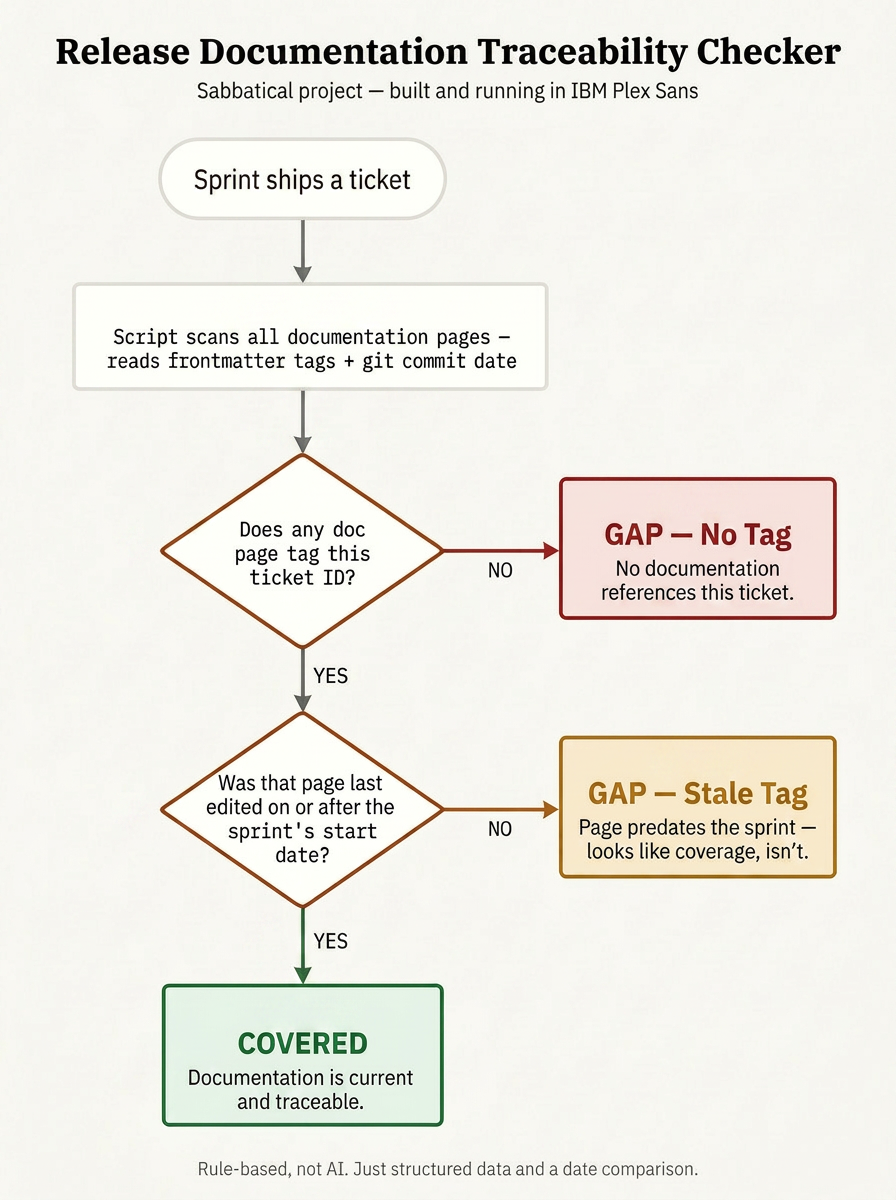
Checker Objective
The goal is to answer a question tag-based coverage tools don’t ask: not just whether a ticket is documented, but whether the documentation is actually current.
Key objectives:
- catch tickets with no documentation at all
- catch tickets whose documentation predates the work it claims to cover
- report both failure types distinctly, not as one generic “gap”
- run against real commit history, not assumed freshness
The system is read-only against the documentation set - it flags gaps, it never edits content.
How Coverage Is Determined
A ticket is marked covered only when both conditions hold:
1. At least one documentation page tags the ticket
2. That page was last edited on or after the ticket's sprint start date
If either condition fails, the ticket is logged as a gap - and the reason is recorded along with it.
Two Ways a Ticket Fails
| Gap type | What it means | Why it slips past manual review |
|---|---|---|
| No tag | No documentation page references the ticket | Usually noticed eventually - it’s the obvious gap |
| Stale tag | A page tags the ticket but predates the sprint that built it | Passes any check that only confirms a tag exists, not whether it’s current |
Both gap types are visible on the live dashboard, with a legend explaining the distinction. One stale-tag case in the current dataset wasn’t deliberately built in - the checker caught it in test data I’d assumed was clean.
How It Runs
The checker runs in four stages:
- Ingest - sprint, epic, and ticket data, modeled on a simulated Jira structure
- Scan - a Node script reads every documentation page’s frontmatter tags and its real git commit date
- Compare - each tagged ticket’s doc commit date is checked against its sprint’s start date
- Report - a per-sprint and per-feature rollup, with every gap named, typed, and explained
No model and no inference at any stage — only structured data and a date comparison. The sprint and ticket data is simulated; the checking logic itself is real, and runs against any markdown-based documentation repository that uses frontmatter tagging.
Design Principles
A tag is a claim, not proof. The checker treats “this page tags the ticket” as something to verify, not something to trust.
Real history over assumed freshness. Every check runs against actual git commit dates, not a status field someone could forget to update.
Two failure modes, reported separately. Collapsing “no tag” and “stale tag” into one generic gap loses the distinction that makes the second one worth catching at all.
Related
Documentation Health Operating Cycle - extends freshness and coverage checks across all pages, not just sprint-tagged ones
AI Governance & Review Operating Model - the layer that decides what AI is and isn’t trusted to flag